Last Updated on January 27, 2026 by Jawad
Keyboards are one of the most important parts of any computer setup. Whether you use a computer for work, gaming, studying, or casual browsing, your keyboard plays a big role in how comfortable and productive you feel. When buying a keyboard, most people face one common question: Should I choose a mechanical keyboard or a membrane keyboard?
At first glance, both types look similar. They have keys, letters, and symbols, and they connect to your computer in the same way. However, the technology under the keys is very different, and that difference affects typing feel, speed, noise, durability, price, and overall experience.
In this article, we will explain mechanical and membrane keyboards in detail, compare them side by side, and help you understand which one is better for your needs. This guide is written in simple English so anyone can understand it easily.
What Is a Mechanical Keyboard?
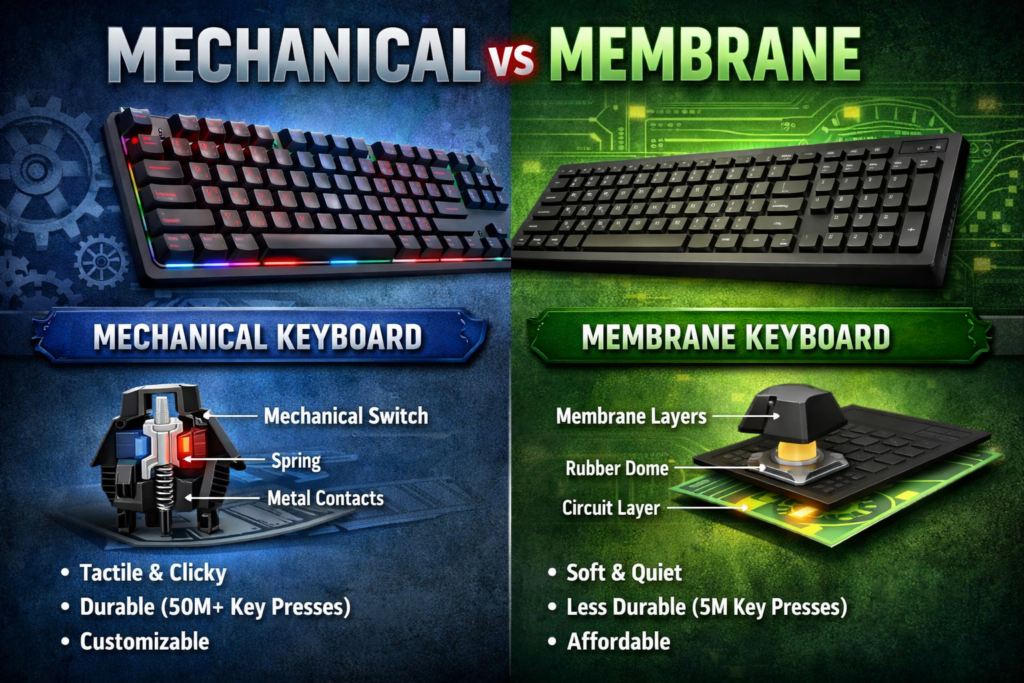
A mechanical keyboard is a type of keyboard where each key has its own individual mechanical switch underneath. These switches are made of several parts, usually including a housing, a spring, and a stem. When you press a key, the switch moves down, the spring compresses, and an electrical signal is sent to the computer.
Mechanical keyboards have been used for many years, especially in older computers. In recent times, they have become very popular again, mainly among gamers, programmers, and typing enthusiasts.
Check our recommendations of Best Mechanical Keyboard for Beginners
How Mechanical Switches Work
Each key on a mechanical keyboard works independently. This means pressing one key does not affect the others. The switch activates at a certain point during the key press, which is often before the key is fully pressed down. This allows for faster typing and better response.
Because of this design, mechanical keyboards feel more precise and consistent compared to membrane keyboards.
Types of Mechanical Switches
One of the biggest advantages of mechanical keyboards is the variety of switches available. Different switches offer different typing experiences.
Linear Switches
Linear switches move straight up and down smoothly. They do not have a bump or click sound.
- Smooth keypress
- Quiet compared to clicky switches
- Popular for gaming
Tactile Switches
Tactile switches have a small bump you can feel when the key activates.
- Good feedback while typing
- Balanced for typing and gaming
- Slightly noisy but not loud
Clicky Switches
Clicky switches make a noticeable click sound when pressed.
- Very satisfying for typing
- Loud typing sound
- Not ideal for shared spaces
Each type suits different users, which is why mechanical keyboards are highly customizable.
What Is a Membrane Keyboard?
A membrane keyboard is the most common type of keyboard found in offices, schools, and homes. Instead of individual switches, membrane keyboards use a thin rubber or silicone membrane layer under the keys.
When you press a key, it pushes the rubber dome down, which then makes contact with a circuit layer below. This completes the circuit and sends a signal to the computer.
Membrane keyboards are popular because they are cheap, lightweight, and quiet.
How Membrane Keyboards Work
Under the keys, there are usually three layers:
- Top membrane layer with pressure pads
- Middle layer with holes
- Bottom layer with electrical circuits
When a key is pressed, the top layer touches the bottom circuit layer through the hole in the middle layer, registering the keypress.
This design is simple and cost-effective, but it does not offer the same precision or durability as mechanical switches.
Mechanical Vs Membrane Keyboard: Comparison Table
Here’s a detailed comparison table to clearly show the differences between Mechanical and Membrane keyboards:
| Feature | Mechanical Keyboard | Membrane Keyboard |
|---|---|---|
| Technology | Individual mechanical switches under each key | Rubber or silicone membrane layer |
| Typing Feel | Strong tactile feedback, satisfying response | Soft, cushioned, less tactile |
| Noise Level | Can be loud (especially clicky switches) | Quiet and soft |
| Durability (Lifespan) | Very high — ~50M–100M keystrokes per key | Lower — ~5M–10M keystrokes per key |
| Responsiveness | Fast actuation, accurate | Slower, requires full keypress |
| Gaming Performance | Excellent, supports N-key rollover & anti-ghosting | Limited, may miss multiple key presses |
| Customization | Highly customizable (keycaps, switches, lighting) | Very limited |
| Price Range | Higher ($40 → $200+) | Lower ($10 → $30) |
| Weight & Portability | Heavier, bulkier | Lightweight, portable |
| Maintenance | Easy to clean & repair | Harder to clean |
| Noise Suitability | Not ideal for quiet environments | Great for offices & shared spaces |
| Best Use Case | Typing, gaming, power users | Casual use, office environments |
| Ergonomics | Better for long typing sessions | Softer feel but less precise |
| Environmental Impact | Fewer replacements long-term | More frequent replacements |
| Key Switch Options | Wide range (linear, tactile, clicky) | Essentially none |
| Replacement Parts | Available (switches/keycaps) | Rarely available |
Typing Feel and Experience
Mechanical Keyboard Typing Feel
Mechanical keyboards are known for their strong feedback and solid feel. Each keypress feels clear and intentional. Because the switches activate before bottoming out, you do not need to press keys all the way down, which can reduce finger fatigue over time.
Many users describe typing on a mechanical keyboard as satisfying and enjoyable, especially for long typing sessions.
Membrane Keyboard Typing Feel
Membrane keyboards feel soft and mushy compared to mechanical keyboards. You usually need to press the key all the way down for it to register. This can make typing feel slower and less accurate, especially for fast typists.
However, some users prefer the softer feel because it is gentle and quiet.
Noise Level Comparison
Mechanical Keyboards
Mechanical keyboards can be noisy, especially those with clicky switches. Even linear and tactile switches produce more sound than membrane keyboards due to the mechanical parts inside.
Noise can be reduced with:
- Quieter switches
- O-rings
- Sound-dampening materials
Still, mechanical keyboards are generally louder.
Membrane Keyboards
Membrane keyboards are very quiet. The rubber dome absorbs most of the sound, making them ideal for offices, libraries, classrooms, or shared rooms.
If silence is your top priority, membrane keyboards are usually the better choice.
Durability and Lifespan
Mechanical Keyboard Durability
Mechanical keyboards are built to last. Most mechanical switches are rated for 50 to 100 million key presses per key. This means a mechanical keyboard can last many years, even with heavy daily use.
Keyboards with metal frames and high-quality components can last a decade or more.
Membrane Keyboard Durability
Membrane keyboards usually last 5 to 10 million key presses per key. Over time, the rubber dome can wear out, making keys feel inconsistent or unresponsive.
They are not designed for long-term heavy use and often need replacement after a few years.
Gaming Performance
Mechanical Keyboards for Gaming
Mechanical keyboards are very popular among gamers because of:
- Faster response time
- Better accuracy
- N-key rollover (multiple keys pressed at once)
- Custom switches for different gaming styles
The precise actuation point helps in competitive gaming where every millisecond matters.
Membrane Keyboards for Gaming
Membrane keyboards can handle casual gaming but may struggle with:
- Multiple simultaneous key presses
- Slower response
- Less consistent feedback
Some gaming membrane keyboards improve performance, but they still cannot fully match mechanical keyboards.
Typing Speed and Accuracy
Mechanical keyboards often help users type faster and more accurately due to better key feedback. Typists can feel exactly when a key registers, reducing mistakes.
Membrane keyboards may slow down fast typists because of the need to bottom out keys and the lack of tactile feedback.
Customization Options
Mechanical Keyboards
Mechanical keyboards offer extensive customization, including:
- Hot-swappable switches
- Custom keycaps
- RGB lighting
- Different layouts (60%, 65%, TKL, full-size)
- Programmable keys
This makes them very attractive to enthusiasts.
Membrane Keyboards
Membrane keyboards have limited customization. Most models do not support switch changes or custom keycaps. RGB lighting is usually basic or absent.
Maintenance and Repair
Mechanical keyboards are easier to clean and repair. Individual switches or keycaps can be replaced if something breaks.
Membrane keyboards are difficult to repair. If the membrane layer is damaged, the entire keyboard usually needs replacement.
Price Comparison
Mechanical Keyboard Price
Mechanical keyboards are generally more expensive. Prices can range from:
- Budget models: affordable
- Mid-range: higher quality
- Premium models: expensive
You pay more for durability, performance, and customization.
Membrane Keyboard Price
Membrane keyboards are very affordable. Many good options are available at low prices, making them ideal for budget users or temporary setups.
Portability and Weight
Membrane keyboards are lighter and easier to carry, making them suitable for travel or office use.
Mechanical keyboards are heavier due to metal plates and switches, though compact mechanical keyboards are now available.
Use Case Comparison
Best for Mechanical Keyboards
- Gamers
- Programmers
- Writers
- Heavy typists
- Long-term users
- Custom keyboard fans
Best for Membrane Keyboards
- Office workers
- Students
- Casual users
- Quiet environments
- Budget buyers
Health and Ergonomics
Mechanical keyboards can reduce finger strain because keys activate with less force and do not require full presses. This can help during long typing sessions.
Membrane keyboards require more force over time, which may cause fatigue for heavy users, though they feel softer initially.
Environmental Impact
Mechanical keyboards last longer, which means fewer replacements and less electronic waste over time.
Membrane keyboards are often replaced more frequently, contributing to more waste.
Pros and Cons Summary
Mechanical Keyboard Pros and Cons
Membrane Keyboard Pros and Cons
Mechanical vs Membrane: Which One Should You Choose?
The best keyboard depends on your needs and preferences.
Choose a mechanical keyboard if:
- You type or game a lot
- You want long-term durability
- You enjoy customization
- You prefer precise key feedback
Choose a membrane keyboard if:
- You want a quiet keyboard
- You are on a tight budget
- You use the keyboard occasionally
- You work in a shared environment
Final Thoughts
Mechanical and membrane keyboards both have their place in the market. Mechanical keyboards focus on performance, durability, and customization, while membrane keyboards focus on affordability, silence, and simplicity.
There is no single “best” keyboard for everyone. Understanding the differences helps you make the right choice based on how you use your computer.
If you spend many hours typing or gaming, a mechanical keyboard is usually worth the investment. If you need a simple, quiet, and affordable keyboard for everyday tasks, a membrane keyboard will do the job well.

Jawad is a passionate tech enthusiast and writer who loves exploring the latest trends in hardware, gadgets, and digital innovation. With a sharp eye for performance and value, he delivers in-depth recommendations and buying guides to help readers make smarter tech decisions.