
Last Updated on February 10, 2026 by Jawad
Introduction
RGB gaming keyboards have become very popular among gamers because they combine style, comfort, and performance in one device. These keyboards are designed to make gaming more enjoyable by adding colorful lighting effects that look great on any desk, especially in low-light rooms. RGB lighting is not just for looks, it can also help players see keys clearly, set custom colors for different games, and create a more immersive gaming setup. Many RGB keyboards allow users to control lighting effects through software, so you can choose static colors, rainbow waves, breathing effects, or match colors with other gaming accessories.
Most RGB gaming keyboards available on Amazon come with features that are useful for both casual and competitive gamers. Mechanical RGB keyboards are especially popular because they offer faster response times, better durability, and a more satisfying typing feel compared to regular membrane keyboards. Gamers can choose different switch types depending on their preference, such as smooth and quiet switches or clicky and tactile ones. Anti-ghosting and N-key rollover are also common features, which means every key press is registered accurately, even during fast and intense gameplay.
Another reason RGB gaming keyboards are a good choice is their strong build quality and extra gaming features. Many models include dedicated media keys, programmable macro keys, wrist rests, and sturdy frames that last for years. RGB keyboards are available in different sizes too, like full-size, tenkeyless, and compact layouts, so users can pick what fits their desk and play style best. With a wide range of options and price points on Amazon, RGB gaming keyboards are a great upgrade for anyone looking to improve both the look and performance of their gaming setup.
We also have a recommendation for the Best Hot-Swappable Mechanical Keyboards, so make sure to check that out too!
Top RGB Gaming Keyboard


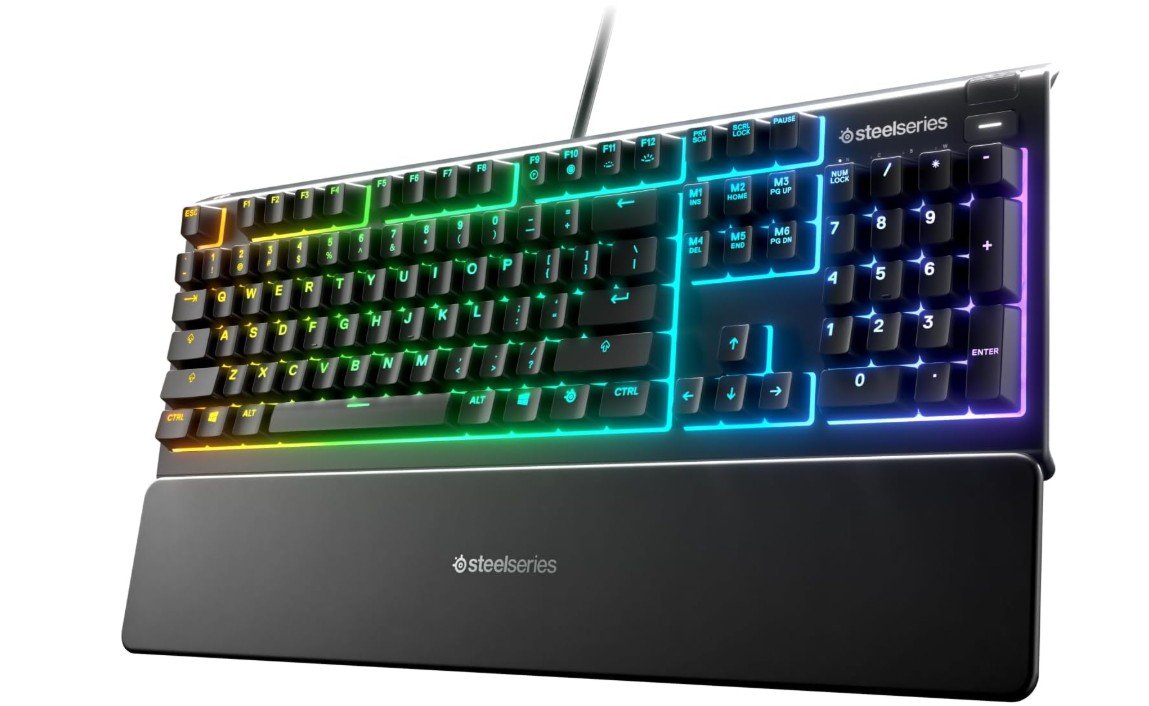
SteelSeries Apex 3 RGB Gaming Keyboard
SteelSeries Apex 3 RGB Gaming Keyboard
The SteelSeries Apex 3 RGB Gaming Keyboard is a great choice for gamers who like bright and colorful lighting effects. The RGB lights on this keyboard are one of its strongest features. You get 10 zones of lighting, which means you can see different colors in many areas across the keyboard. The lights are smooth and bright, and they make your gaming setup look lively and exciting. You can choose from many preset lighting effects, like rainbow waves or breathing colors, and change them easily with the SteelSeries Engine software. The software is simple to use, so even beginners can create or customize light patterns without any trouble.
The lighting not only looks good but also helps you see the keys better in dark rooms. This is especially helpful when you are playing games late at night or streaming with low lights. The colors stay bright and clear, and you can make your keyboard match the rest of your gaming gear if you have other RGB accessories. The lighting reacts well to different games and can be set up for specific profiles, which adds an extra level of immersion to your gameplay.
The keyboard itself feels solid and comfortable to use. The keys are quiet, which is nice if you share a room or don’t want loud clicking sounds. The premium magnetic wrist rest is soft and helps your hands feel relaxed during long gaming sessions. The keyboard is also water resistant, so small spills won’t easily damage it. It connects with a simple USB cable, and setup is fast.
Overall, the Apex 3 RGB makes your gaming area look amazing with colorful, customizable lights. If you enjoy RGB lighting and want a keyboard that is both stylish and functional, this SteelSeries keyboard is worth considering. The lighting truly makes a difference in the experience.
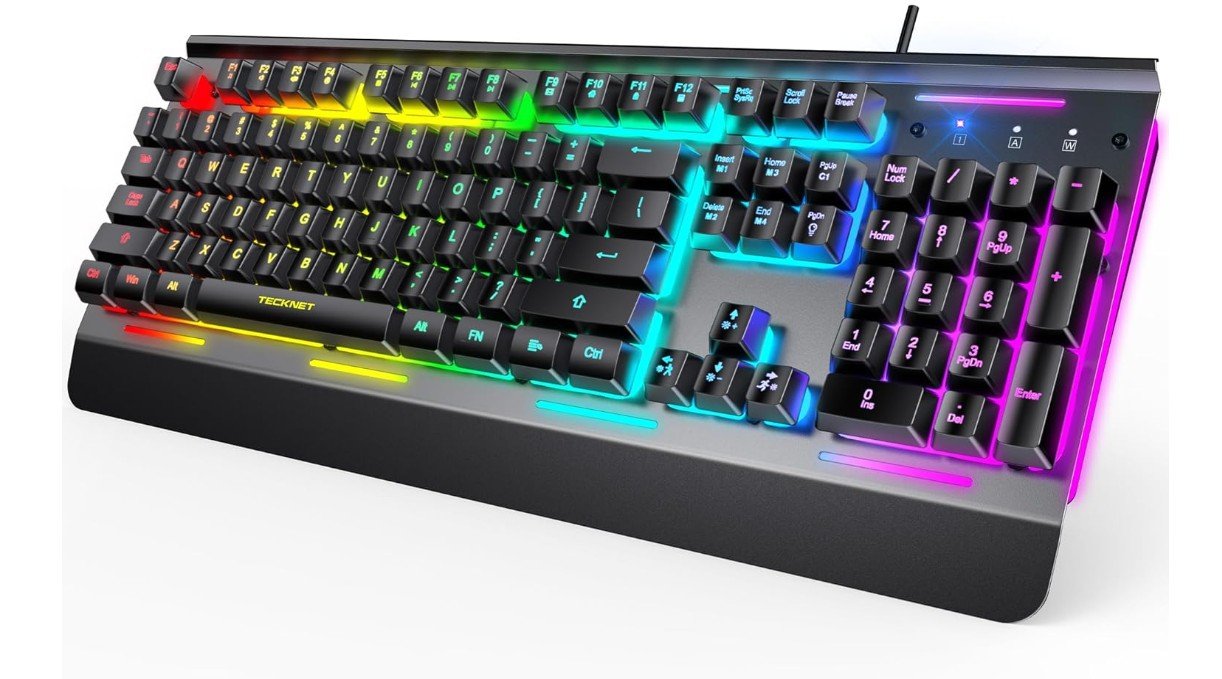
TECKNET Gaming Keyboard
TECKNET Gaming Keyboard
The TECKNET Gaming Keyboard is a solid choice for gamers who love colorful RGB lighting. The RGB lights on this keyboard are one of its main highlights. It has 15 lighting zones, which means you get more areas of color compared to many basic RGB keyboards. The lights are bright and smooth, and they make your desk look exciting and lively. You can choose from different lighting effects like waves, breathing patterns, and color shifts. Changing the lighting is easy, and it helps make the keyboard look great no matter what game you are playing. The RGB lighting also helps you see the keys better in dark or low-light rooms, which can be useful during late-night gaming sessions.
The keyboard’s lighting adds a fun and immersive feel to gaming. When the lights move in waves or change colors, it creates a nice atmosphere that can make playing games more enjoyable. If you have other RGB accessories, the keyboard’s lighting helps tie your setup together with matching colors and effects. The colors stay bright and clear, and you can easily pick effects that suit your style. Even though the lighting zones are not per-key, the 15 zones still offer a strong visual impact that many gamers will like.
Aside from lighting, the keyboard also feels strong and comfortable. The all-metal panel adds stability and makes the keyboard feel solid. The keys are quiet and responsive, so typing and gaming both feel good. The 25 anti-ghosting keys help make sure your key presses are accurate, even during fast gameplay. The keyboard is also water resistant, so small spills won’t damage it easily.
Overall, the TECKNET Gaming Keyboard delivers impressive RGB lighting that makes your gaming setup look energetic and fun. If you enjoy colourful lighting and want a keyboard with strong visual effects, this one offers great value. The lighting truly stands out and enhances the overall gaming experience.
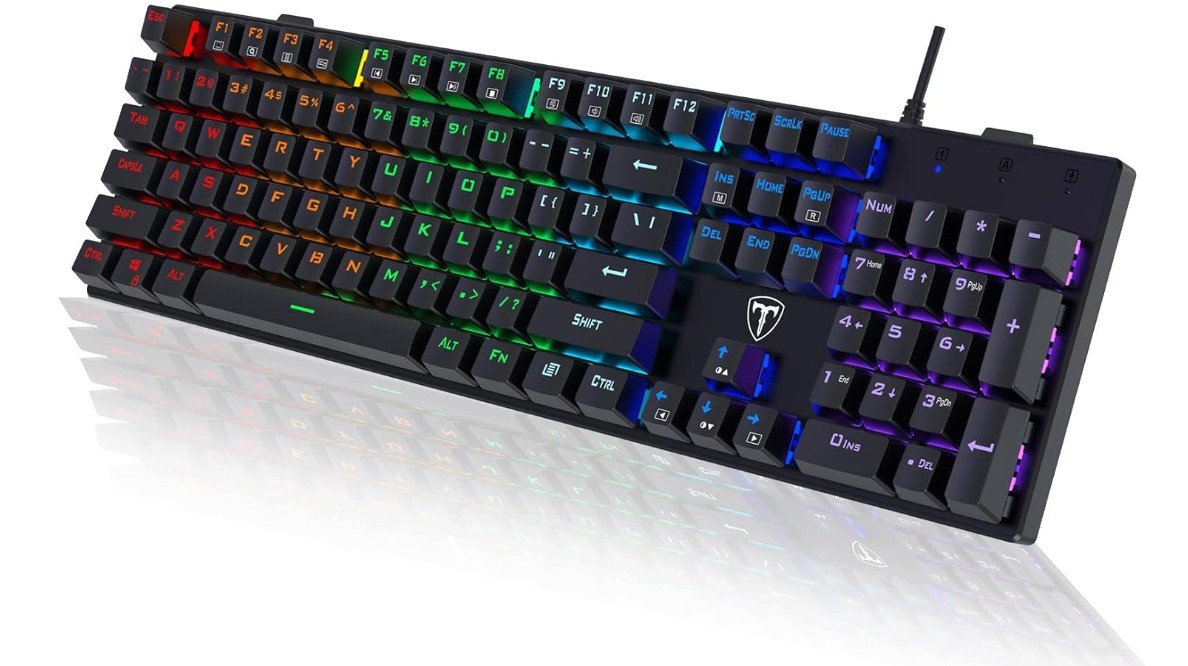
RisoPhy Mechanical Gaming Keyboard
RisoPhy Mechanical Gaming Keyboard
The RisoPhy Mechanical Gaming Keyboard brings strong RGB lighting that adds a lively and colorful look to any gaming setup. The RGB backlit lights cover all 104 keys and create bright, eye-catching effects. You can see different colors shining across the keyboard, and the lights make the keys easier to see in dark rooms. This is especially helpful when you are gaming at night or in low light. The colors are vivid and change smoothly, giving your desk a fun and energetic feel. Even though it does not have advanced software for deep customization, the built-in lighting modes are easy to switch between and look great right out of the box.
The lighting enhances the overall experience by making games feel more immersive and exciting. When you play fast games, the glowing keys help guide your eyes quickly across the keyboard, which can make it easier to react and play better. The RGB lights also make the keyboard look more stylish, and they match well with other RGB gear you might have, like your mouse or PC lights. This makes your whole gaming area look more unified and attractive.
Beyond the lighting, the RisoPhy keyboard feels solid and comfortable to use. The blue mechanical switches are clicky and responsive, which many gamers enjoy for both typing and gaming. Each key press feels satisfying and accurate, and the keyboard includes anti-ghosting so multiple keys can be pressed at once without errors. The keyboard also has a slim design and durable ABS keycaps that hold up well over time. It is spill-resistant, so small accidents won’t easily damage the keyboard.
Overall, the RisoPhy Mechanical Gaming Keyboard offers strong RGB lighting that stands out and makes your gaming setup look better. The lighting is bright, fun, and easy to enjoy, especially for players who want a colorful and responsive keyboard without a lot of complicated setup. If RGB lighting and solid performance are important to you, this keyboard delivers great value.
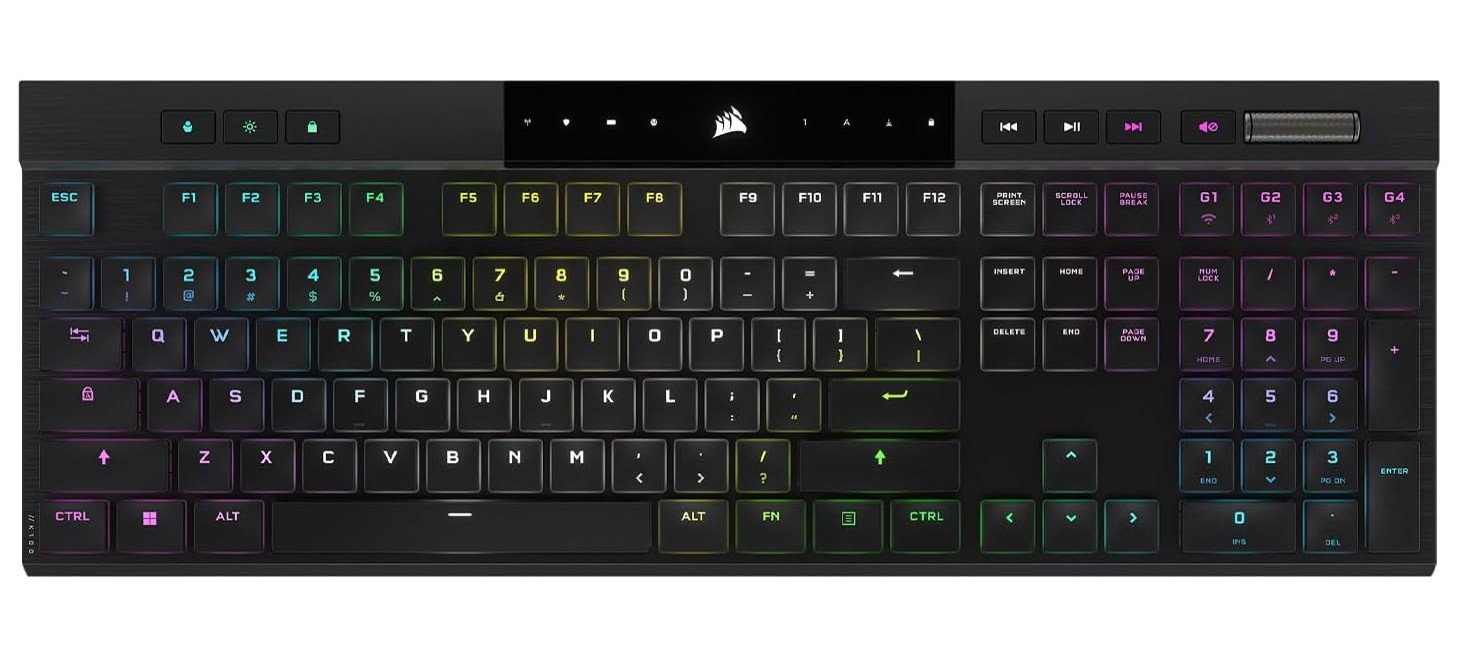
Corsair K100 AIR Wireless RGB Mechanical Gaming Keyboard
Corsair K100 AIR Wireless RGB Mechanical Gaming Keyboard
The Corsair K100 AIR Wireless RGB Mechanical Gaming Keyboard brings stunning RGB lighting that shines on any gaming desk. The RGB lights on this keyboard are bright, smooth, and full of color. You can see different lighting effects that flow across the keys and make the keyboard look alive. The lighting looks great from all angles and adds a cool, modern feel to your setup. Whether you like slow color changes, rainbow waves, or custom themes, the RGB lights make your games feel more exciting and immersive. The colors are easy to see even in bright rooms, and they look especially impressive in darker environments.
Using the Corsair iCUE software, you can change lighting effects quickly and make your own patterns. The software makes it simple to link the keyboard lighting with other RGB accessories like fans, mouse, or PC case lights. This helps create a full RGB experience that matches your style. You can also set lighting profiles for different games so the colors change to fit the mood of each game you play. This feature makes the RGB lighting not just beautiful but also useful for identifying key commands and improving focus during gameplay.
Beyond the lighting, the keyboard feels great to use. The Cherry MX Ultra Low Profile switches offer a smooth and quick response, which helps during fast gaming moments. The keyboard is wireless, and the lighting stays strong even when connected through Bluetooth or Corsair’s fast Slipstream connection. The slim design and clean look make the keyboard feel premium and modern.
Overall, the Corsair K100 AIR delivers one of the best RGB lighting experiences you can get in a wireless gaming keyboard. The lighting is bright, customizable, and works very well with other RGB gear. If you care about having eye-catching lights and great performance in your gaming setup, this keyboard is an excellent choice.
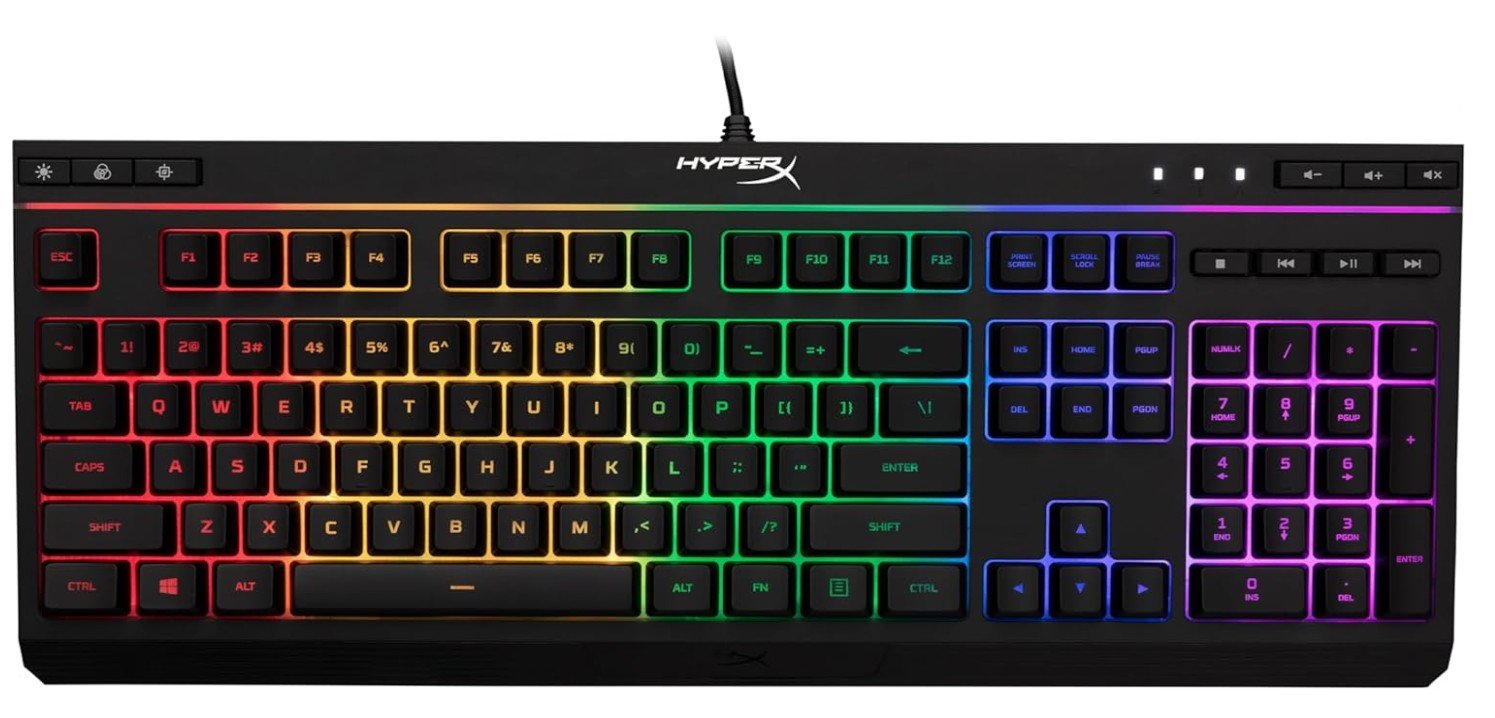
HyperX Alloy Core RGB
HyperX Alloy Core RGB
The HyperX Alloy Core RGB gaming keyboard has eye-catching RGB lighting that makes it a fun choice for gamers who want colorful effects without spending too much. The RGB lights are bright and easy to see, and they offer many preset lighting modes like rainbow waves, breathing effects, and reactive colors that change when you press keys. These lighting effects make your gaming setup look more lively and engaging. Even in a well-lit room, the colors stay clear and vibrant, and in darker rooms they really stand out. The keyboard lets you switch lighting modes with simple key combinations, so you don’t need extra software to make changes.
The RGB lighting isn’t just for looks — it also helps you see the keys better, especially when playing games at night or in dim lighting. The lights shine through each key and around the edges, giving your desk a cool glow. You can see the different effects change smoothly, and the colors feel balanced and enjoyable to watch during long gaming sessions. It adds a more exciting feel to your overall gaming experience.
Aside from the RGB lighting, the Alloy Core feels comfortable to type and play on. The membrane keys are quiet and soft, which is great if you don’t like loud clicking sounds. The keyboard also has dedicated media keys, so you can adjust volume, play, or pause music easily without leaving your game. The build is strong, and the keyboard is spill-resistant, meaning small accidents won’t easily damage it.
Overall, the HyperX Alloy Core RGB gaming keyboard brings strong lighting effects that make your gaming area look great. It’s simple to use, fun to watch, and adds color to your setup without needing complicated software. If you want an affordable keyboard with attractive RGB lighting and good comfort, this one delivers a solid experience.
RGB Gaming Keyboard — a complete buying guide
Why RGB matters
RGB lighting is more than decoration for many gamers: it improves visibility in low light, helps you mark important keys (macros, ability binds), and ties your whole setup together when synced with other gear. There are two common RGB styles to know: per-key RGB (each key has its own LED for full customization) and zone/segment RGB (the board is divided into a few colored zones). Per-key gives the most flexibility for game profiles and custom effects; zone lighting is cheaper and still looks good.
Switch types (why they matter)
Switches define feel, sound, and speed. Mechanical switches are the standard for gaming; within them you’ll see linear (smooth, fast), tactile (bump feedback), and clicky (audible click) varieties. Big switch brands include Cherry MX, Gateron, and Kailh — Cherry MX is often praised for durability and consistency, while Gateron and Kailh offer excellent value and many modern variants (factory-lubed, silent, low-profile). If you want quiet typing, look for silent or low-profile switches; if you want sharp actuation for esports, choose a light linear or low-travel switch.
Key rollover & anti-ghosting
N-Key Rollover (NKRO) and anti-ghosting ensure multiple simultaneous key presses are registered reliably — critical for fast, complex inputs in games. If you play fast-paced competitive games, prefer keyboards that advertise full NKRO or at least 6–10 key rollover. This avoids missed or “ghost” presses during intense moments.
Size & layout choices
- Full-size (104 keys): best if you need a numpad for work.
- Tenkeyless (TKL): removes numpad — more desktop space and better mouse movement.
- 75% / 65% / 60%: more compact, minimal, needs function-layer learning.
Choose based on desk space and whether you use the numpad or macros frequently.
Build quality & materials
Look at plate material (aluminum, steel, or plastic). Metal or aluminum plates feel stiffer and reduce flex. Keycaps: ABS is common and cheaper but shines over time; PBT is more durable and preferred by enthusiasts. A detachable USB-C cable, braided cable, and a solid case mean better long-term value.
Hot-swappable switches
Hot-swappable sockets let you change switches without soldering. If you want to try different switch types (or replace a bad switch), hot-swap is a huge convenience. Many mid-to-high tier boards offer this now.
Software & ecosystem
RGB customization, macros, and game integrations usually come through manufacturer software (Corsair iCUE, Razer Synapse, Logitech G Hub, SteelSeries Engine). These apps let you create profiles, synchronize lighting across devices, and bind macros — but software quality varies; some heavy apps can be clunky or resource-hungry. If you want deep lighting control and device sync, check the software’s reputation before buying.
Wired vs wireless vs low-latency wireless
Wired gives lowest latency and no battery worries. Modern wireless solutions (proprietary low-latency dongles) can achieve sub-1ms performance and are excellent for those who need a clean desk. Bluetooth is convenient but higher latency and can be less consistent for fast gaming. If you’re a competitive gamer, wired or a high-performance wireless mode is safest.
Additional features to consider
- Per-key macro programming and onboard storage (save profiles to keyboard)
- Dedicated media keys and volume wheel for convenience
- Wrist rest (magnetic or detachable) for comfort during long sessions
- Water/spill resistance if you’re clumsy or drink near your desk
- Battery life reporting and adjustable RGB power modes (for wireless boards)
Price tiers & what to expect
- Budget (≤ $50–$70): membrane or basic mechanical clones, zoned RGB, limited software. Good for casual users.
- Mid-range ($70–$150): true mechanical switches, per-key or many zones, hot-swap sometimes, better software. Best value for most gamers.
- Premium (>$150): high-end switches (factory lubed/linear/optical), full per-key RGB, premium build, low-latency wireless options, advanced software and extras (macro keys, OLED displays).
Who should buy what
- Competitive FPS player: light linear switches, TKL or compact, wired/low-latency wireless, and NKRO.
- MMO/MOBA player: full-size or TKL with dedicated macro keys and per-key RGB for binds.
- Streamer/enthusiast: per-key RGB, strong software, and signature effects for camera looks.
- Budget shopper: zoned RGB is fine, focus on build and basic NKRO.
Maintenance & care
Clean keycaps and switches every few months. Use compressed air to remove dust; remove and wash keycaps (if ABS/PBT) and dry fully. Keep firmware and software updated for new RGB features or bug fixes.
FAQs
An RGB gaming keyboard features multicolor backlighting under each key or in lighting zones that you can customize with effects (wave, ripple, per-key colors, etc.), adding style and better visibility in low light.
RGB lighting doesn’t improve game performance, but it can help highlight important keys and create visual cues, plus it enhances the look of your setup.
Most keyboards include software to customize lighting profiles, macros, and effects — letting you sync lighting with games or adjust per-key colors.
Higher-end RGB keyboards often offer more lighting zones, better switches, customization software, and build quality. If you’re serious about gaming or aesthetics, they’re worth the upgrade.
Final tips
If RGB is the main draw, prioritize per-key lighting and strong software that synchronizes other gear. If performance is the priority, prioritize switches, NKRO, and low-latency connectivity over fancy lighting effects. Read recent user reviews for the exact model and check that the software supports the lighting profiles you want — some brands update lighting features more often than others.

Jawad is a passionate tech enthusiast and writer who loves exploring the latest trends in hardware, gadgets, and digital innovation. With a sharp eye for performance and value, he delivers in-depth recommendations and buying guides to help readers make smarter tech decisions.

