Last Updated on January 3, 2026 by Jawad
Mechanical-switch debates never die — and for good reason. Two of the most-talked-about linear switches on the market are Cherry MX Red and Gateron Red. Both are popular choices for gamers and typists who prefer a smooth, quiet keystroke without the tactile bump or click. But while they look similar on paper (both linear, similar actuation weights), the real-world experience can differ in subtle — and sometimes decisive — ways.
This article breaks down everything you need to know: how each switch is built, how they feel and sound out of the box, how they respond when modded or lubricated, durability and quality-control differences, price and availability, and finally, which one you should choose based on your priorities. No fluff — just practical, hands-on advice.
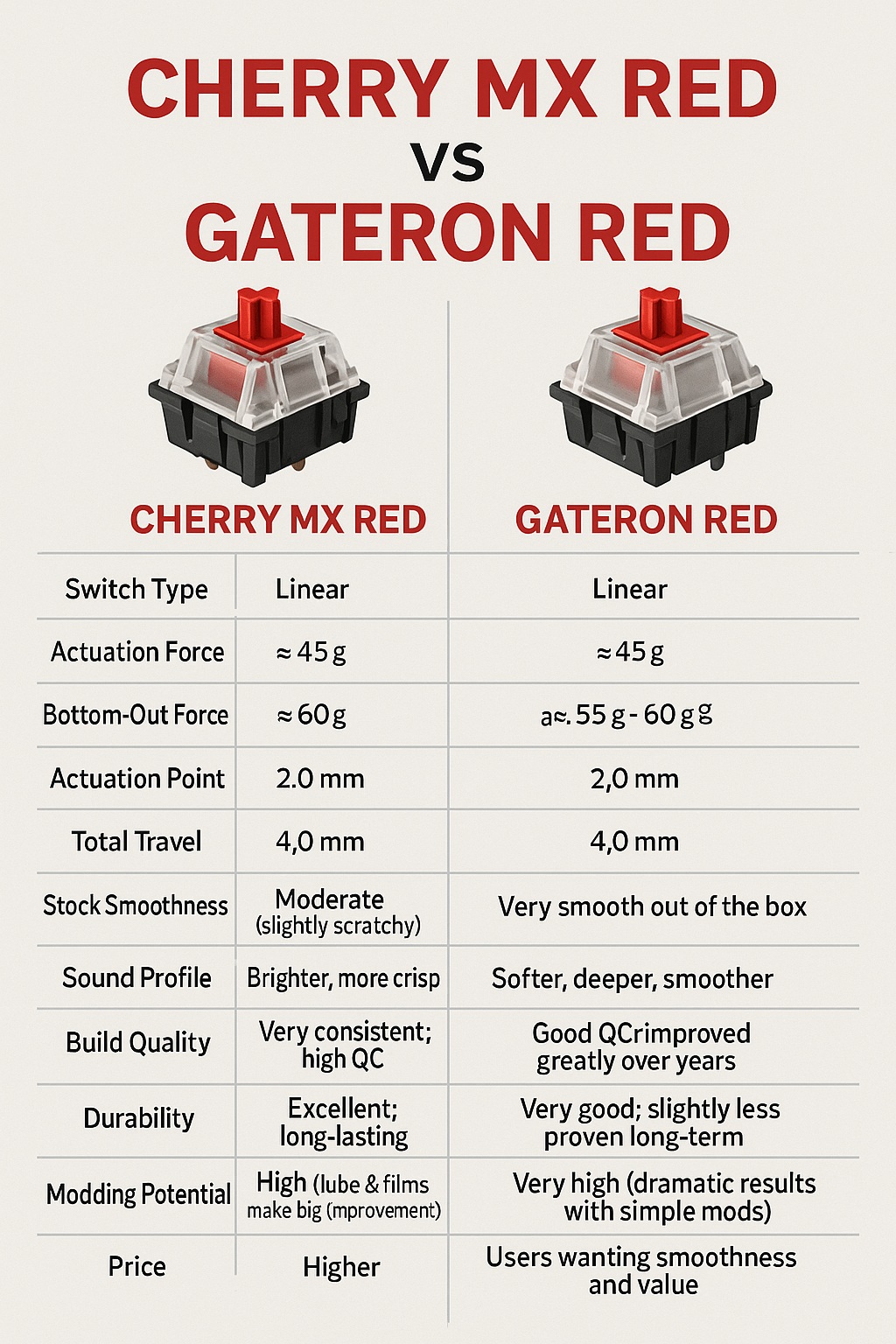
Cherry MX Red vs Gateron Red — Infographic
Quick summary
Which to choose: If you want the smoothest out-of-the-box linear at the best price, go with Gateron Red. If you want long-standing industry-standard consistency and reputation, pick Cherry MX Red. If you plan to heavily mod (lube, films, springs), both can be made great — Gateron rewards minimal modding more, Cherry rewards careful modding for a refined result.
Cherry MX Red — classic, reliable, consistent. Often feels slightly firmer and a touch scratchier straight out of the box. Favored by users who prioritize long-term reliability and a neutral baseline for mods.
Gateron Red — smoother stock feel and generally cheaper. Excellent value and popular with people who like a silky linear sound right away or who plan to mod for a premium sound/feel on a budget.
Anatomy & basic specs (what the numbers mean)
Both switches are linear: the stem moves straight up and down with no tactile bump or click. Typical specifications for both are very similar:
- Type: Linear
- Actuation force: ~45 cN (commonly listed as 45 g)
- Total travel: ~4.0 mm
- Actuation point: ~2.0 mm
- Lifespan rating: often advertised around 50 million keystrokes (check vendor specs)
These numbers tell you the basic mechanical behavior: moderate actuation force paired with a relatively short actuation point makes them popular for fast-paced gaming where quick repeated presses matter.
But identical spec sheets don’t mean identical feel. The devil is in materials, tolerances, lubrication, and manufacturing processes.
Build quality & materials
Cherry MX Red
Cherry — a German company with decades in mechanical-switch design — pioneered the modern MX-style mechanical switch. Their reputation rests on conservative, high-quality manufacturing and tight tolerances.
- Materials & molding: Cherry housings and stems are made from engineering-grade plastics designed for durability and consistent geometry.
- Tolerance & QC: Cherry’s quality control tends to be stricter; that means more consistent travel, less variance between switches in the same batch, and fewer defective stems/pins.
- Stability: Cherry stems have a reputation for controlled wobble (not too loose), contributing to predictable typing.
Gateron Red
Gateron is a Chinese switch maker that became famous by offering smoother-feeling clones/variants of Cherry switches at lower prices. Over the years, they’ve improved production and introduced many variants.
- Materials & molding: Gateron often uses different plastics and slightly different stem geometry. Some Gateron stems are made from POM (polyoxymethylene) or other low-friction materials — this can make them feel smoother out of the box.
- Tolerance & QC: Gateron’s QC has improved a lot, but you may still see more variance between batches compared to Cherry. That means some kits of Gateron Reds can be indistinguishably smooth, while others may show light scratchiness or more wobbles.
- Variants: Gateron offers many lines (G Pro, Ink, Milky, Yellow, etc.), so “Gateron Red” might mean slightly different things depending on the exact product.
Feel and sound — real-world typing and gaming
This is where most users make their decision.
Out of the box
- Gateron Red: Many users report smoother keypresses straight out of the box. The travel often feels slicker and almost glides through the stroke. This is because of different stem tolerances, lower-friction plastics, and sometimes factory lubrication.
- Cherry MX Red: Tends to feel firmer and a bit more “mechanical.” Some describe Cherry Reds as having a very mild scratchy feel at the top of travel — not rough, just a little more feedback than a perfectly lubed switch. For people who prefer a neutral, consistent linear with a slightly crisp bottom-out, Cherry often wins.
Sound profile
- Gateron Red: Often quieter and deeper-sounding because the smoother travel reduces high-frequency sandpaper noises. If the housing is a bit looser, you may also get a lower-pitched thock (subject to keyboard plate and case).
- Cherry MX Red: Brighter and snappier sounding in many setups. With stock keycaps and no mods, Cherry Reds can give a sharper bottom-out click (not a tactile click, but an audible impact sound).
Stability & wobble
- Gateron: Some Gateron batches have slightly more stem wobble due to looser tolerances, which can affect consistency for fast typing — but it also contributes to a “floaty” feeling some users like.
- Cherry: Generally less wobble and a tighter, more centered feel on each press.
Modding potential (lubing, filming, spring swaps)
If you enjoy modifying switches, both respond well — but results differ.
- Gateron Red: A favorite for modders because they often need less aggressive lubing to reach an ultra-smooth result. Many enthusiasts claim Gaterons are the easiest to make buttery-smooth. Film them (reduce housing wobble), add a light coat of lubricant to the stem and springs, and you get a near-premium linear at a fraction of the cost.
- Cherry MX Red: Also mod-friendly and often benefits more from lubing because their stock feel is a bit firmer. After proper lubrication and filming, Cherry Reds become excellent and very consistent switches — some prefer Cherry after modding for the combined smoothness and stability.
If you’re into heavy switch modding, Gateron gives more bang for the buck; if you want a plug-and-play, predictable modded experience, Cherry is safer and more uniform.
Durability and longevity
Both brands advertise lifespans around tens of millions of keypresses (50M is common marketing language). In practice:
- Cherry has decades of field-proven durability and is known for long-term reliability.
- Gateron has improved and is reliable for everyday use, but its long-term reputation is still playing catch-up with Cherry in some users’ minds.
For most users — gamers and typists alike — both switches will outlast the keyboard’s useful life.
Price and availability
- Gateron Red: Usually cheaper, sold in many group buys and bulk packs. Great choice if you need lots of switches for many keyboards or for testing modding without spending much.
- Cherry MX Red: More expensive, often found pre-soldered on OEM keyboards or as higher-cost retailer items. Cherry’s brand premium contributes to the higher price.
If budget is a factor, Gateron frequently wins.
Compatibility & OEM usage
- Cherry switches are the de facto standard for many keyboard manufacturers and are commonly used in prebuilt mechanical keyboards (especially older and mid-range OEMs). This means Cherry-stem keycap compatibility and broad acceptance.
- Gateron is widely supported too, and modern keycap standards (MX stems) make both fully compatible with aftermarket keycaps. Some keyboard makers also use Gateron in their stock boards because of cost and smoother feel.
Functionally, both will fit in hot-swap MX-compatible sockets and with standard MX-compatible keycaps.
Pros & cons (clear at-a-glance)
Cherry MX Red
Pros
- Consistent, predictable feel and travel
- Excellent quality control and reliability
- Strong brand reputation and readily available OEM boards
- Slightly firmer, which some typists/gamers prefer
Cons
- Can feel slightly scratchier/springy out of the box compared to Gateron
- Usually more expensive
- Some users find them less “buttery” without modding
Gateron Red
Pros
- Often smoother out of the box
- Cheaper, high value — great for bulk or modding
- Many variants and modern experimental lines
- Very popular with the custom keyboard community
Cons
- Batch-to-batch variance possible — less predictable QC than Cherry
- Slightly more stem wobble reported by some users
- Long-term durability reputation not as entrenched as Cherry (though still strong)
Which should you pick? (decision guide)
Ask yourself these quick questions:
- Do you want plug-and-play reliability and uniformity? → Cherry MX Red.
- Do you want the smoothest out-of-the-box feel for the lowest price? → Gateron Red.
- Do you plan to heavily mod/lube switches? → Gateron Red if you want less work to get buttery results; Cherry if you want consistent modded performance.
- Are you buying a keyboard prebuilt and don’t want to solder or swap? → Consider the switch listed on the board; Cherry is commonly used and reliable.
- Is price a major factor and you’re building multiple keyboards? → Gateron Red for cost efficiency.
Practical recommendations by use-case
- Competitive gamer (fast double-taps, precision): Cherry MX Red may offer more predictable actuation consistency under long sessions. But many pro gamers actually prefer Gateron because the smoother travel can slightly reduce finger fatigue. Both are viable — choose based on personal preference.
- Casual gamer/typist who wants a smooth stock feel: Gateron Red is likely to please immediately.
- Keyboard hobbyist who mods & tunes switches: Gateron is economical and mod-friendly; great for experimentation.
- Office or heavy daily typist who wants reliability & low maintenance: Cherry’s consistency and history make it a solid pick.
How to test them yourself (quick checklist)
If you can try both before buying, use this checklist:
- Try the key travel: Press slowly and fast. Does it feel smooth or scratchy?
- Listen: Type a sentence and listen for pitch. Do you prefer a deeper thock or a sharper snap?
- Wobble check: Wiggle the keycap lightly. Too much side play might bother you.
- Double-tap & roll test: For gaming, try quick repeated presses; do they feel consistent?
- Try with your keycaps/plate: The same switch can sound and feel different depending on keycap material and plate (aluminum vs brass vs polycarbonate).
Final thoughts
There’s no absolute “better” between Cherry MX Red and Gateron Red — only better for your tastes and priorities. Cherry is the safe, conservative pick: consistent, professional, and widely trusted. Gateron is the modern-value champion: smoother, often cheaper, and irresistible for modders and users who prefer silkier travel.
If you want a single bottom line: if you value consistency and warranty-backed reputation, choose Cherry MX Red; if you value smoothness, mod-tweak potential, and price, Gateron Red is likely the better choice. Either way, both switches are excellent representatives of the linear category, and both will perform well in gaming and typing when paired with the right keyboard build and (if you like) a little modding love.

Jawad is a passionate tech enthusiast and writer who loves exploring the latest trends in hardware, gadgets, and digital innovation. With a sharp eye for performance and value, he delivers in-depth recommendations and buying guides to help readers make smarter tech decisions.